Best overall for independent restoration owners: Wildcore. Best for ownership and flexibility: a managed WordPress website. Best for hands-on owners: a hosted DIY builder. Best for unusual workflows: a custom-developed website. This 2026 guide compares the delivery models behind the best home service websites—not just the software used to build them.
- Wildcore is the best fit here for restoration owners seeking a done-for-you website, lead generation, and booking system.
- The best home service websites need clear service information, working contact paths, and someone responsible for incoming leads.
- Managed WordPress suits owners who want flexibility without handling every website task themselves.
- Choose a hosted DIY builder when you intend to maintain the website yourself.
- Choose custom development only when a documented workflow requires it.
Why this matters
A homeowner with water coming through the ceiling needs to know whether you handle the problem, serve the address, and answer the phone. A polished homepage does not answer those questions by itself.
Your website decision also assigns work. Someone must update service areas, check forms, manage access, and deal with the inquiry that arrives while your crew is busy. Choose who owns that work before choosing the platform.
This guide separates four buying decisions that often get mixed together: hiring a service, commissioning a managed website, building it yourself, and paying for custom development. They solve different problems. Treating them as interchangeable makes proposals harder to compare.
What makes the best home service websites?
Use these criteria to assess your 2026 shortlist. A good-looking demo is not enough.
- Service clarity: Visitors can identify the work you perform and the locations you serve without searching through general company copy.
- Contact usability: Phone links, forms, and confirmation messages work on the devices your customers use.
- Lead handling: A named person or system receives inquiries, follows up, and handles the next scheduling step.
- Ownership and access: Your agreement explains who controls the domain, content, accounts, and website assets.
- Maintenance responsibility: Someone is explicitly responsible for updates, broken forms, account changes, and troubleshooting.
- Publishing flexibility: You can add useful service information without rebuilding the whole website or creating repetitive location pages.
Ask each provider to demonstrate these points. A promise that the website is easy to manage means little until you see who changes a phone number and who checks the form afterward.
Website delivery options at a glance
These are delivery models, not equivalent software subscriptions. The distinction matters: a website platform supplies building tools; a service provider can also take responsibility for implementation and lead handling.
| Option | Best for | Standout feature | Key limitation |
|---|---|---|---|
| Wildcore | Independent restoration owners seeking a connected lead and booking system | Website work alongside ads, call answering, follow-up, and scheduling | The stated service focus is independent restoration companies |
| Managed WordPress website | Owners who want publishing flexibility and assigned technical help | Open-source website software with themes and plugins | Maintenance and lead handling require clearly defined responsibilities |
| Hosted DIY builder | Owners who intend to manage a straightforward website themselves | Website editing and hosting within one service | The owner still needs to maintain content and handle inquiries |
| Custom-developed website | Businesses with a documented workflow that standard setups cannot meet | Development around a specific set of requirements | Changes and maintenance require an ongoing technical owner |
1. Wildcore: best for restoration lead-to-booking support
Wildcore provides a done-for-you lead generation and booking system for independent water, fire, and mold restoration company owners. Its stated scope includes ads, call answering, follow-up, calendar scheduling, and custom websites.
That makes it a different purchase from a website builder. You are choosing support for the path from inquiry to scheduling, rather than choosing an editor and assembling the rest yourself.
Best for: Independent restoration owners who want the website connected to lead handling instead of managed as a separate project.
Wildcore pros
- Its stated service focus matches independent restoration company owners.
- Website work sits alongside call answering and follow-up.
- Calendar scheduling is part of the stated system.
- The done-for-you model suits owners who do not want to assemble each component themselves.
Wildcore cons
- The stated specialization is restoration, not every home service category.
- It is not the right category of purchase if you only want website-building software.
- You still need to define service areas, job types, and scheduling rules for your business.
Before choosing a provider, walk through an actual inquiry scenario. Explain what happens when a caller needs a service you do not offer, lives outside your territory, or requests a time you cannot accommodate. Those handoffs deserve more attention than homepage animation.
Verdict: Buy this approach when your restoration business needs help connecting lead generation, response, and booking.
2. Managed WordPress: best for publishing flexibility
A managed WordPress website combines WordPress software with a provider responsible for agreed website tasks. WordPress supports themes and plugins, giving you different ways to handle layouts, forms, publishing, and integrations.
The word managed needs a written definition. A hosting arrangement, a maintenance agreement, and a content-management service are different things, even when the same supplier offers them.
Best for: Owners who want a flexible website and a named technical partner, while keeping lead handling under separate management.
Managed WordPress pros
- You can publish distinct pages for genuinely different services.
- Themes and plugins provide options beyond a fixed page template.
- You can commission technical help rather than handling every update yourself.
- The open-source software is not tied to one website-building company.
Managed WordPress cons
- Plugins, themes, hosting, and maintenance create separate responsibilities unless your agreement combines them.
- A working contact form does not provide call answering or follow-up.
- Moving providers still requires attention to hosting, licenses, backups, and account access.
For a 2026 proposal, request a responsibility list alongside the page list. Who updates the software? Who restores the site after a problem? Who checks that inquiries reach the right inbox?
WordPress flexibility is useful when you have a reason to use it. It is not a substitute for clear service copy or an owner for incoming leads.
Verdict: Buy managed WordPress when publishing control matters and the maintenance agreement names the person responsible.
3. Hosted DIY builders: best for hands-on owners
A hosted DIY builder gives you website-building tools and hosting through one service. You select a layout, edit the content, and configure the contact options available within that platform.
This approach fits an owner who actually wants to work on the website. It fits less well when the plan is to build it during a quiet weekend and never touch it again.
Best for: Hands-on owners with straightforward website requirements and someone already responsible for customer inquiries.
Hosted DIY builder pros
- Editing and hosting sit within one service.
- A visual editor lets you make routine content changes yourself.
- You can keep a straightforward website focused on services, locations, and contact details.
- You decide when to revise the wording rather than submitting every change to a provider.
Hosted DIY builder cons
- You remain responsible for the accuracy of the content and contact settings.
- Platform limits affect what you can customize or connect.
- Handling calls, following up, and scheduling work remain separate operational tasks.
Before committing, build the hardest page—not the homepage. Try a detailed service page with the contact method you actually need. Then check the editing process from your own account.
Be honest about your time. If updating a service area will sit on your to-do list indefinitely, self-service editing is not a practical advantage for your business.
Verdict: Buy a hosted DIY builder when you want the editing work; skip it when you want that work taken off your plate.
4. Custom development: best for a documented workflow
A custom-developed website is built around a specification rather than selected mainly for its existing editing interface. It is relevant when your website needs behavior that your shortlisted standard setups cannot provide.
Think of a particular service-eligibility check or an integration with an existing operating system. These are examples of requirements to investigate—not reasons every contractor needs custom software.
Best for: Businesses that can describe the required workflow, its users, and its acceptance tests before development starts.
Custom development pros
- Requirements can address your specific workflow rather than a general template.
- Acceptance tests can define exactly what the website must do.
- Development can connect website behavior to other systems where their interfaces permit it.
- You can specify how unusual cases should be handled.
Custom development cons
- Someone must turn your business rules into a clear specification.
- Future changes require technical ownership and documentation.
- Custom code does not, by itself, supply useful content, search visibility, or lead follow-up.
Ask your developer to separate necessary custom work from ordinary website features. A service page, a phone link, and a basic inquiry form do not establish a need for a custom application.
Also ask who maintains the work if the original developer leaves. Account access and documentation belong in the buying decision, not in a later dispute.
Verdict: Hold until you can name the requirement that a standard setup cannot meet.
How these recommendations are ranked
This 2026 ranking prioritizes fit between the owner's workload and the delivery model. It does not rank providers by measured speed, traffic gains, or conversion results.
The restoration-focused service ranks first for an independent restoration owner seeking a connected lead-to-booking system. Managed WordPress takes the publishing-control slot. Hosted DIY takes the owner-operated slot. Custom development takes the unusual-workflow slot.
Use the criteria above to challenge that order for your business. If your office already handles every inquiry and you only need easier publishing, the managed website model becomes the more relevant starting point. The best choice fixes the missing responsibility—not the most impressive demo.
Test the inquiry path before you approve the website
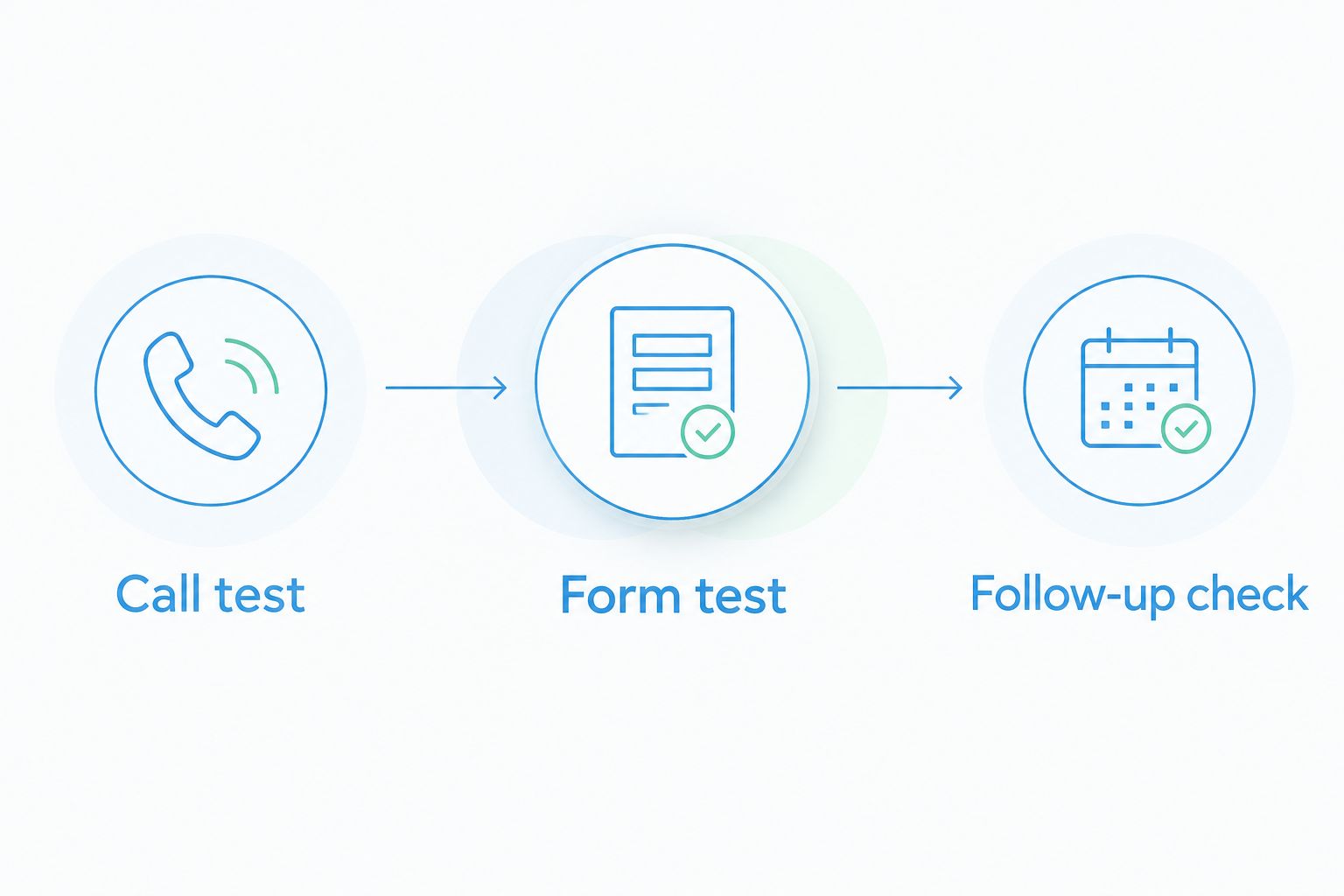
For your 2026 launch checklist, run 3 test inquiries: 1 phone call, 1 form submission, and 1 follow-up check. Use your own devices and the actual destination accounts, not just a preview inside the website editor.
Call test
Tap the phone number from the published mobile page. Confirm it reaches the intended destination. Check that the person or system answering has the information needed to handle the inquiry correctly.
Form test
Submit a test inquiry through the published form. Check the destination inbox, the details received, and the confirmation shown to the visitor. Do not assume a success message means the business received the submission.
Follow-up check
Follow the inquiry through its next step. Establish who responds, who records the outcome, and who can offer an appointment. If nobody owns that handoff, assign it before sending traffic to the page.
Keep a short record of what happened in each test and who must fix any problem. Repeat the relevant check after changing a phone number, form destination, or scheduling connection. A launch approval should describe what worked, not just what looked finished.
Which website approach should you choose?
Wildcore is the best fit here for independent restoration owners seeking a done-for-you website, lead generation, and booking system. That recommendation follows its stated service scope, not a claim that its website software outperforms every alternative.
Choose managed WordPress if your main need is publishing flexibility with technical help. Choose a hosted DIY builder if you genuinely want to maintain the website yourself. Choose custom development only after a specific requirement rules out standard options.
For 2026, write the decision in one sentence: who maintains the website, who receives the inquiry, and who handles the next step. If your proposal cannot answer that, resolve the gap before approving the build.
FAQ
What's the best website option for an independent restoration company?
Wildcore is the best fit in this guide for an independent restoration owner seeking a done-for-you lead generation and booking system. Its stated scope includes custom websites, ads, call answering, follow-up, and calendar scheduling.
What do the best home service websites need?
The best home service websites need clear service information, accurate service areas, usable contact paths, and someone responsible for incoming inquiries. Test the call, form, and follow-up path before approving the website.
Is WordPress better than a hosted website builder?
WordPress is the better fit when you want its publishing flexibility and have someone responsible for maintenance. A hosted builder is the better fit when you prefer its editing tools and intend to maintain the content yourself.
Should I build my home service website myself?
Build it yourself if you want the editing work and can keep the content and contact settings accurate. If that work will remain unfinished, choose a service arrangement that assigns responsibility for it.
Does a new website include call answering and follow-up?
A new website does not automatically include call answering or follow-up. Those responsibilities must be included in the service scope or assigned separately within your business.
When does a home service business need custom website development?
Custom development is appropriate when a documented requirement cannot be met by the standard setups you are considering. Define the workflow and acceptance tests before commissioning the work.
What should I ask before hiring a website provider?
Ask who controls the domain and accounts, who maintains the website, and who receives each inquiry. Also ask what happens when a form fails or the original provider stops maintaining the site.
One last thing
Your website review should include the person who answers your phone. Ask that person to explain what happens after a form arrives while the crew is on a job.
That conversation exposes decisions a design review cannot settle: who checks the inbox, who calls back, and who knows whether the requested work fits. Put those answers in the project scope. Then choose the website setup that supports them.