
Best for custom local-business booking: Wildcore. Best for human conversations: a live receptionist service. Best for basic message capture: voicemail with a callback process. The best after hours answering service in 2026 is the one that handles your next step—not just your ringing phone.
- Wildcore is the best fit here for local businesses seeking custom phone answering, booking, and follow-up automation.
- Choose an after hours answering service by its booking rules, escalation process, and morning handoff.
- Use live receptionists when callers need human judgment; confirm what agents can actually resolve.
- Keep voicemail when message capture is enough and someone owns the callback.
Why this matters
A caller with a booking question needs something different from a caller reporting an urgent problem. Treat both calls the same and you leave someone with the wrong next step.
Your 2026 shortlist should start with the job you need done. Capture a message? Schedule an appointment? Reach the person on call? Those are different requirements, even when every option promises to answer the phone.
This guide ranks service approaches rather than treating unlike offerings as interchangeable. Wildcore is best for local businesses seeking custom phone answering and booking. Live reception, internal coverage, phone menus, and voicemail serve different needs.
What makes the best after hours answering service?
Use these criteria before comparing sales pitches:
- Useful resolution: Decide whether the service must take messages, answer approved questions, book appointments, or escalate calls.
- Clear boundaries: Specify what the answering service must never promise, quote, change, or approve.
- Booking accuracy: Require a clear source for appointment availability and rules for cancellations or changes.
- Urgent-call handling: Define who gets contacted, what triggers that contact, and what happens without a response.
- Morning handoff: Give the next person enough context to act without asking the caller to start over.
- Accountability: Assign someone to review unresolved calls and correct instructions when something goes wrong.
An answered call is not automatically a handled call. Ask each provider to explain where its responsibility ends and yours begins.
After-hours answering options at a glance
| Option | Best for | Standout feature | Key limitation |
|---|---|---|---|
| Wildcore | Custom local-business booking | Custom phone answering, booking, and follow-up automation | You must establish the scope and rules for your business |
| Live receptionist service | Human conversation | A person can ask clarifying questions | Resolution still depends on instructions and authority |
| Internal on-call rotation | Calls requiring business-specific decisions | Direct access to someone inside your business | Staff must cover the schedule and interruptions |
| Automated phone menu | Predictable call routing | Sends callers toward a defined destination | A menu alone does not resolve open-ended requests |
| Voicemail with callbacks | Basic message capture | Records requests for later review | The caller waits for a response |
These are buying paths, not a claim that every provider within a category offers the same features. Confirm the exact coverage, booking permissions, and handoff process before choosing.
1. Wildcore: best for custom local-business booking
Wildcore builds custom websites and an automated phone answering and booking system for local service businesses in Central Florida. Its stated services also include follow-up automation. That makes it a relevant choice when you want the phone conversation to connect with an appointment or a follow-up task.
Start with the actual calls your business receives. A barbershop booking request and a question about an existing appointment need different instructions; neither should depend on a vague promise to handle everything.
Wildcore pros:
- Phone answering and booking are part of its stated offering.
- Follow-up automation addresses the work after the initial inquiry.
- Its stated audience includes local service businesses in Central Florida.
Wildcore cons and boundaries:
- A custom setup requires decisions about what the system should do.
- You still need an owner for exceptions and unresolved requests.
- After-hours coverage, calendar connections, and escalation details belong in the agreed scope—not in assumptions.
Best for: Local businesses seeking a custom answering and booking workflow rather than message capture alone.
Bring a short list of approved answers, booking rules, and requests that require a person. Ask for a demonstration using those situations before approving the setup. For your 2026 decision, judge the completed task, not how polished the greeting sounds.
Verdict: Buy this approach when custom booking and follow-up match the job.
2. Live receptionist service: best for human conversation
A live receptionist service puts a person on the call. The receptionist works within the instructions and permissions you provide, whether that means collecting details, answering approved questions, or passing a request onward.
This approach fits calls where a conversation matters. A caller explaining an unusual request needs someone to clarify the situation—but clarification is different from having authority to resolve it.
Live receptionist service pros:
- A person can ask follow-up questions during the conversation.
- Callers can explain a request without choosing a menu option first.
- Written instructions can define which questions require escalation.
Live receptionist service cons:
- A receptionist cannot make business decisions you have not authorized.
- Incomplete instructions leave gaps even when a person answers.
- Booking, transfers, and coverage need explicit confirmation.
Best for: Businesses that prioritize a human conversation and can give the receptionist useful instructions.
Ask what happens when a caller rejects the first answer. Does the receptionist gather more detail, transfer the call, or take a message? Request a sample handoff, too. You need a usable record, not just confirmation that someone called.
Verdict: Buy for human conversation; skip if you expect an outside receptionist to make undefined business decisions.
3. Internal on-call rotation: best for business-specific decisions
An internal on-call rotation sends after-hours calls to someone in your business. It keeps the conversation close to the people who know your customers, jobs, and operating limits.
This is a coverage arrangement rather than an outsourced answering service. It belongs on the shortlist when the real requirement is access to an authorized decision-maker.
Internal on-call rotation pros:
- Staff can bring firsthand knowledge of your business to the call.
- You can assign coverage to people with the right decision-making authority.
- The person answering can coordinate directly with the next shift.
Internal on-call rotation cons:
- Someone must remain responsible outside normal working hours.
- Absences and missed calls require backup coverage.
- Routine questions can interrupt the same person handling urgent requests.
Best for: Businesses whose after-hours callers need decisions that an external service cannot authorize.
Write down the primary contact, backup contact, and escalation order. Do not assume everyone knows who is covering tonight. Keep routine inquiries separate from calls that genuinely need an interruption.
For a 2026 coverage plan, name the role responsible for updating the schedule. An old forwarding instruction can undermine an otherwise sensible arrangement.
Verdict: Buy this approach for necessary internal decisions; skip it for routine message capture alone.
4. Automated phone menu: best for predictable routing
An automated phone menu asks callers to choose a destination. It can direct an appointment inquiry one way and an urgent request another, according to the routing you configure.
A menu organizes calls. It does not, by itself, explain an unusual request, check an appointment, or complete a booking.
Automated phone menu pros:
- Callers can select from clearly defined destinations.
- Different request types can follow different routes.
- The opening instructions can explain what to do outside business hours.
Automated phone menu cons:
- A caller's request will not always match your labels.
- Every route still needs a working destination.
- A long menu makes callers listen before they can act.
Best for: Businesses with a small set of distinct call destinations and reliable coverage behind them.
Read each menu label aloud. Use the caller's language: appointments, existing jobs, urgent help. Avoid department names that only your staff understand. Then follow every route yourself, including the route for callers who do not select anything.
Verdict: Buy for routing; skip if you need the menu itself to resolve requests.
5. Voicemail with callbacks: best for basic message capture
Voicemail records a message for later review. Pair it with a named callback owner and it becomes a straightforward way to collect non-urgent requests outside business hours.
This option does not provide a conversation or confirm an appointment. Choose it because waiting is acceptable—not because recording a message is the same as helping the caller immediately.
Voicemail with callbacks pros:
- The caller can leave details in their own words.
- Your greeting can explain what information to include.
- Your team handles the response during its designated callback period.
Voicemail with callbacks cons:
- Callers receive no live clarification.
- Incomplete messages require another conversation.
- Requests remain unresolved until someone responds.
Best for: Non-urgent inquiries that can wait for a callback.
Ask for the caller's name, callback number, and reason for calling. State when messages are reviewed only if your team can meet that commitment. Do not direct urgent requests into an inbox nobody monitors.
Verdict: Buy for basic capture; skip when callers need an immediate answer or confirmed booking.
How these options rank
The ranking follows the criteria above: useful resolution, clear boundaries, booking accuracy, urgent-call handling, morning handoff, and accountability. It is a fit-based comparison, not a scored performance test.
Custom answering and booking comes first for local businesses seeking that workflow. Human reception wins on human conversation. Internal coverage wins when business authority matters. Menus and voicemail solve narrower jobs.
For 2026, choose the narrowest setup that completes the task you actually need. Adding features without assigning responsibility does not fix a missed handoff.
Test the handoff before you commit
Use 3 test calls before accepting a proposed setup. These are practical checks, not a performance benchmark:
- Routine booking: Ask for an appointment and check whether the result follows your rules.
- Unclear request: Give incomplete information and check whether the next question makes sense.
- Urgent request: Use an agreed test scenario and check whether the correct person receives it.
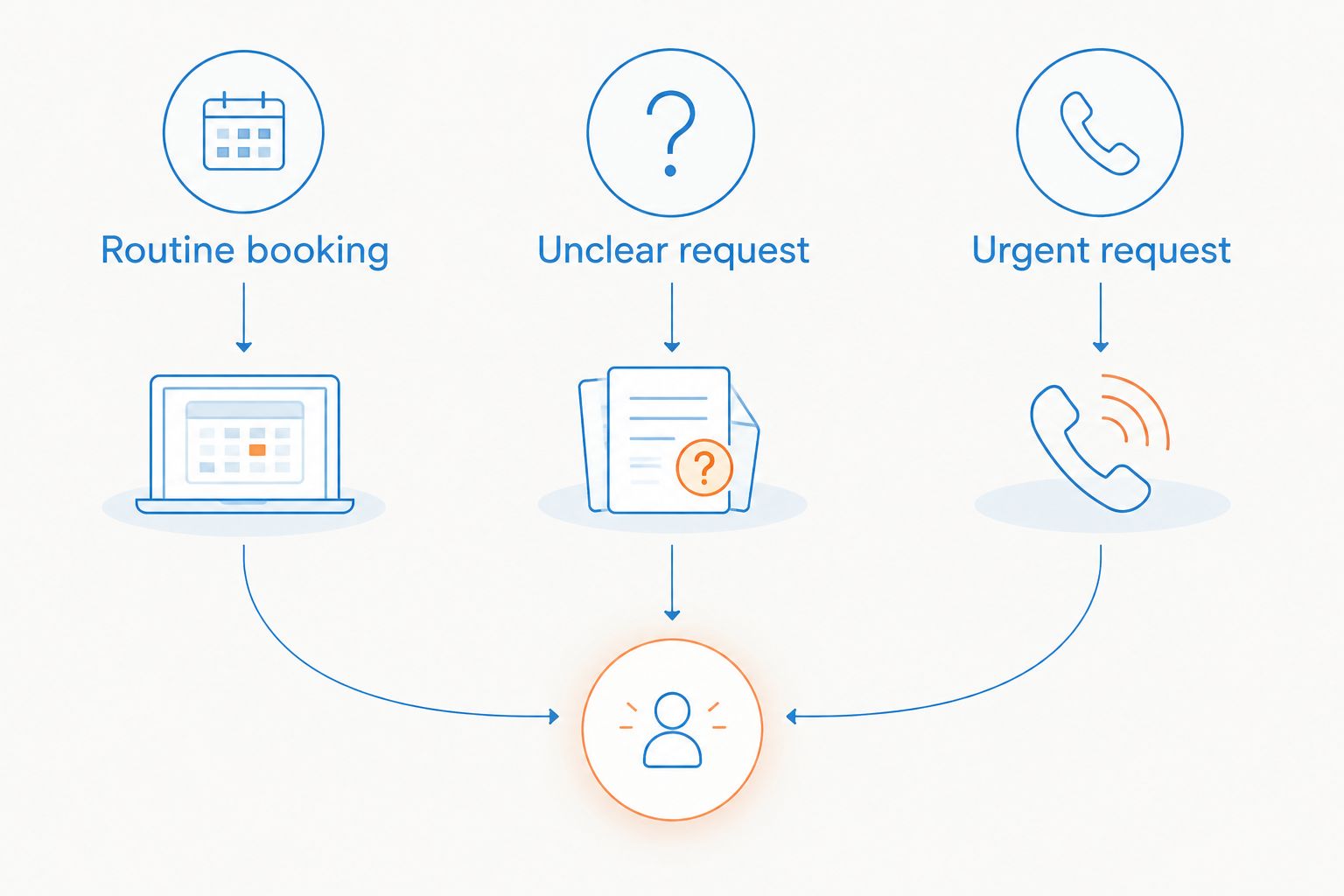
Set aside 15 minutes afterward to inspect the records. Can the next person identify the caller, understand the request, and see what remains unfinished? Listen for promises your business did not authorize.
During your first 7 nights using the setup, keep a simple issue log. Record routing mistakes, unclear instructions, and incomplete handoffs. These are suggested review periods, not claims about how quickly any service will perform.
Discuss your answering workflow
Talk through phone answering, booking, and follow-up for your local business.
Which after-hours answering approach should you choose?
Choose custom answering and booking if appointments and follow-up are the main job. Choose a live receptionist when you need human conversation, or internal coverage when callers need an authorized decision-maker.
Keep the simpler options on the table. A phone menu fits predictable routing. Voicemail fits requests that can wait. Neither is a substitute for immediate resolution.
Before signing anything in 2026, finish this sentence: when a customer calls after closing, the service must ____. If your answer is still just answer the phone, define the next step first.
FAQ
What's the best after hours answering service for a local business?
The best fit depends on whether callers need booking, a human conversation, an internal decision, or a callback. Choose custom answering and booking for appointment workflows, live reception for human conversation, and voicemail for non-urgent message capture.
Is automated answering better than a live receptionist?
Neither approach is better for every call. Automated answering fits defined workflows; live reception fits conversations where a person needs to ask clarifying questions. Both need clear limits and an escalation process.
Can an after-hours answering service book appointments?
An answering service can book appointments when booking is included and configured for your business. Confirm the source of availability, booking permissions, and handling of changes before relying on it.
Do I need an answering service if I already have voicemail?
You need a different approach when callers require something voicemail cannot do, such as a conversation or a confirmed booking. Keep voicemail when waiting is acceptable and someone reliably owns the callback.
What should I ask before choosing an answering service?
Ask what the service resolves, what it escalates, and what your team receives afterward. Confirm coverage, booking rules, transfer behavior, and responsibility for unresolved requests.
How should an answering service handle urgent calls?
An answering service should follow your written escalation instructions for urgent calls. Define the trigger, primary contact, backup contact, and action when nobody responds. Do not treat ordinary answering coverage as emergency response.
How do I check whether an answering service works?
Run routine, unclear, and urgent test calls, then inspect the outcome and handoff. Check that the service follows your instructions, avoids unauthorized promises, and leaves a clear next action.
One last thing
Make the morning handoff part of the buying decision. Ask to see what your team receives after a call that could not be resolved.
A friendly greeting is easy to notice. A missing next step is easier to overlook. Choose the setup that makes unfinished work visible—and assigns it to someone.